
Appium Architecture

Back to Appium Tutorial Index

Appium is an HTTP server which is written in Node.js and exposes REST API. It creates and handles multiple WebDriver sessions. It receives connections from a client, listens for commands, executes those commands on a mobile device, and responds with an HTTP response. It is same as the Selenium server, where in selenium server gets HTTP requests from Selenium client libraries.
Like selenium tests, appium tests are also written once and can be run on multiple devices (well almost). This primarily entails four entities -

  • Tests, written in one of the appium supported languages
  • Appium server (also known as test server), which interacts with device (or emulator) running the test
  • Device (or emulator) to run tests on
  • Machine from where tests are run

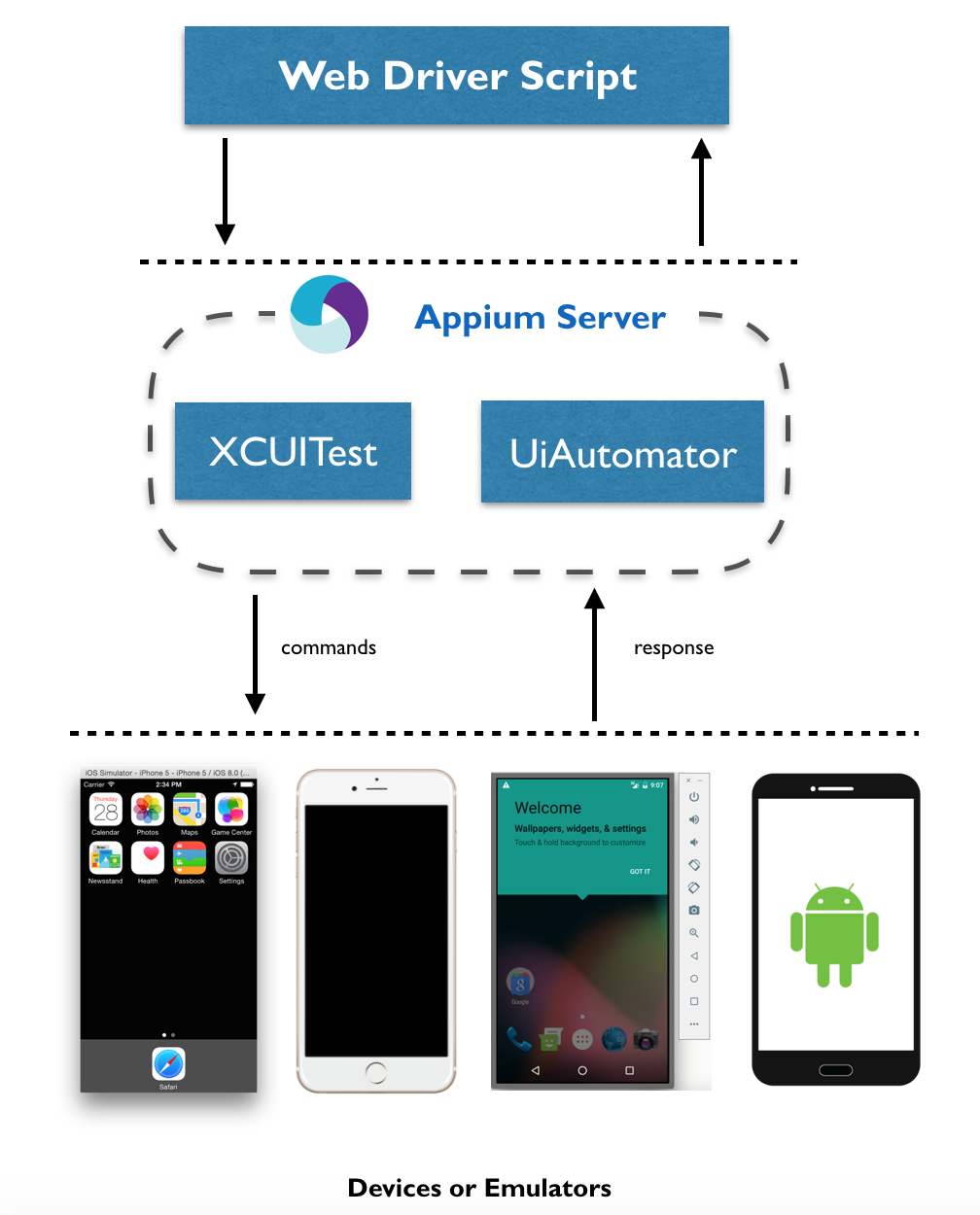
This could be visualized from following Appium Architecture Image
Herein one machine can be used to run both appium server and test. In Appium video tutorial we would be running appium server on the same machine on which tests are executed. Test code performs HTTP calls to server which then translates those commands into device specific actions sent to device.  These commands are user interactions to the device for ex - clicking on button, swiping the screen, scrolling in to area etc
Popular posts from this blog

Selenium Tutorial: Ant Build for Selenium Java project

Ant is a build tool which could be used to have your tests running either from command line or from Hudson CI tool. There is detailed documentation available for ant here but probably you need to know only a little part of it for you selenium tests. The essentials which are needed to know are: Project Target (ant execution point and collection of tasks) Tasks (could be as simple as compilation) And there would usually be following targets for Selenium tools - setClassPath - so that ant knows where you jar files are loadTestNG - so that you could use testng task in ant and use it to execute testng tests from ant init - created the build file clean - delete the build file compile - compiles the selenium tests run - executes the selenium tests Here is my project set up for ant -

Verify email confirmation using Selenium

Note: If you are new to java and selenium then start with selenium java training videos .     How to Verify Email Confirmation Using Selenium 4 and JavaMail (2026 Guide) Updated: 2026 (Original article published August 02, 2011) Email confirmation is an integral part of most registration flows — account activation, password reset, multi-factor authentication, and onboarding emails. Sooner or later, every automation engineer faces the same challenge: How do we verify an email confirmation link inside a Selenium test without making the test slow and flaky? Many beginners try to automate Gmail UI using Selenium. That approach is fragile, slow, and tightly coupled to a third-party UI that changes frequently. A cleaner approach is this: Use Selenium for browser automation. Use JavaMail (IMAP) to read the email directly. Extract the confirmation link. Continue the test using Selenium. This guide shows a modern, production-ready approach using Selenium 4 and JavaMail . Why Not Auto...

Capture network traffic using WebDriver

We often come across testing requirements when we need to analyze the network traffic to find - HTTP status of page Analyze header information to find if right information is passed Validating parameters related to ajax requests etc Selenium 1 has had a way to capture n/w traffic but the feature does not always work as expected. At times Selenium 1 does not capture all n/w traffic, And given that Selenium 1 APIs are almost dead it is