I must say I did not have an easy time trying to set up Selenium Grid 1.0 locally. Since I did not have access to multiple machines I was trying to setup hub as well as slave remote control and was following the doc available here. Though documentation is detailed it is tough to have it replicated with your set up. of late I posted about ant build file here and we need to add couple of target to it to be able to work with Selenium grid. I have taken these extra target from the Selenium Grid distribution, these are -

Target - "launch-hub" is used to launch grid hub while target "launch-remote-control" is used to launch remote controls along with set of parameters like - host, hubURL etc, which would be serving to hub.
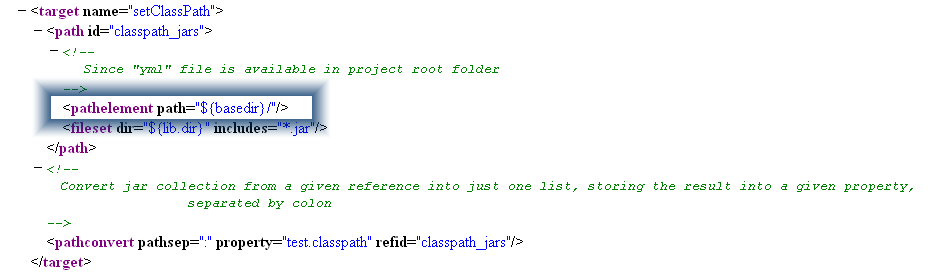
Also notice that from previous post on ant build I have "pathelement" defined in "setclasspath" target.
This is to make sure that while starting the hub "grid_configuration.yml" is picked up from your project root folder and not the one available in selenium-grid jar files -
And now to start the Selenium RC server - the hub. Go to your project root folder on console and execute task - "ant launch-hub" and hub is launched with the configuration you specify in "grid_configuration.yml" file -
 and Now is the turn of launching RC servers with configurations defined in "grid_configuration.yml" file. We would launch two RC servers one - "Firefox on Window" and "IE on Windows" on ports 5555 and 6666 respectively -
 and another RC server -

And now you have to specify configuration of browser environment in you testng.xml file along with the hub port - 4444

And now to run your selenium tests you need to execute target "run" from another console. You would see two browsers launched locally running your tests one on IE and other on Firefox

Target - "launch-hub" is used to launch grid hub while target "launch-remote-control" is used to launch remote controls along with set of parameters like - host, hubURL etc, which would be serving to hub.
Also notice that from previous post on ant build I have "pathelement" defined in "setclasspath" target.
This is to make sure that while starting the hub "grid_configuration.yml" is picked up from your project root folder and not the one available in selenium-grid jar files -
And now to start the Selenium RC server - the hub. Go to your project root folder on console and execute task - "ant launch-hub" and hub is launched with the configuration you specify in "grid_configuration.yml" file -
And now you have to specify configuration of browser environment in you testng.xml file along with the hub port - 4444
And now to run your selenium tests you need to execute target "run" from another console. You would see two browsers launched locally running your tests one on IE and other on Firefox
Complex Post. This record helped me in my college assignment. Thnaks Alot
ReplyDeleteGlad it helped you :)
ReplyDeleteHi Tarun,here is d abnormalitiy.
ReplyDelete1>The window is not getting maximized
2>using selenium.focus is not working properly,focusiing other open window and working on that,so test cases getting failed.but after clearing cache it is working fine again.
3>Also egarding command prompt window,i am sending u the mail as here is no scope for attachment.pls help.hpw to close them automatically or open only one commane window?
Hi Tarun,here is d abnormalitiy.
ReplyDelete1>The window is not getting maximized
2>using selenium.focus is not working properly,focusiing other open window and working on that,so test cases getting failed.but after clearing cache it is working fine again.
3>Also egarding command prompt window,i am sending u the mail as here is no scope for attachment.pls help.hpw to close them automatically or open only one commane window?