
Are your selenium element locators static ?

I usually declare element locator static as well as the helper method using them, since element locators is a class variable or constant and is not dependent on a specific instance of class. For example in the following code snippet, element locators - imageElement and teamDeletionSucessMessage are static. Also, method - isTeamDeletionSucessMessageDisplayed is static -
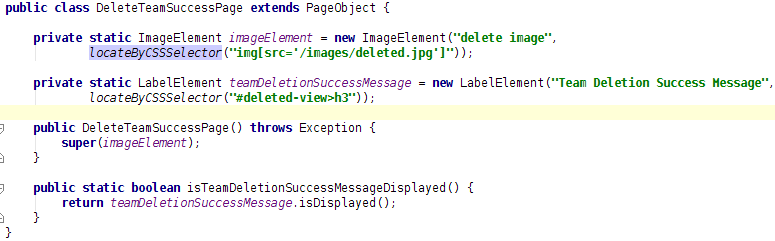

Screenshot from 2016-04-19 15:59:39.png


From one of the SO answer, following can be the requirement to make method static -

  1. If you are writing utility classes and they are not supposed to be changed.
  2. If the method is not using any instance variable(s) or instance method(s). {some thing I consider most important when declaring a variable static}
  3. If any operation is not dependent on instance creation.
  4. If there is some code that can easily be shared by all the instance methods, extract that code into a static method.
  5. If you are sure that the definition of the method will never be changed or overridden. As static methods can not be overridden.
What is your take on this? Are your element locators also static (or even static final)?

Popular posts from this blog

Which location strategy to use with mobile apps

Locator Strategy for native mobile apps IDs and accessibility locators are still king. NSPredicate (iOS) and UIAutomator (Android) are great—mainly better than XPath —but they do not beat a good accessibility id or resource-id . And CSS selectors don’t exist for native apps (only for WebViews). Locator Strategy Ranking Rank iOS (native) Android (native) Why 1 Accessibility ID → name / label (via MobileBy.AccessibilityId or @iOSXCUITFindBy(accessibility = "Mehr anzeigen") ) Accessibility ID → content-desc (via MobileBy.AccessibilityId ) or @AndroidFindBy(accessibility = "Letzte Aktivitäten, Überschrift") ) Fast, readable, stable when set intentionally; improves a11y. 2 Stable identifiers (rare on iOS) resource-id (via new UiSelector().resourceId(...) ) or @AndroidFindBy(id = "load_more") id is just shorthand for matching the native Android resource-id attribute. Appium automatically maps id → resource-id If you pass only "load_more"...

Verify email confirmation using Selenium

Note: If you are new to java and selenium then start with selenium java training videos .     Email confirmation seems to be integral part of any registration process. I came across an application which lets you provide your email address. You can follow the sign up link in you mail and then complete the registration process. Lets consider we provide GMail address for it. Now if were to use only Selenium then we would have to follow following steps - Launch GMail using Selenium; Some how search for new mail in the list of available mails; Some how click on it; Parse the mail message; Get the registration link; Follow up with registration process What do you think of an approach in which you can

Selenium Tutorial: Get attribute of an element

With Selenium 1.0 Let us consider Google Search Box for example and its "max length"is to be retrieved. Using xPath -         String var = selenium.getAttribute("//input[@name='q']/@maxlength");         System.out.println(var); Using css locator -                        String var = selenium.getAttribute("css=input[name='q']@maxlength");         System.out.println(var);        With Selenium 2.0 (WebDriver)        Using xPath -         String var = webDriver.findElement(By.xpath("//input[@name='q']")).getAttribute("maxlength")         System.out.println(var); Using css locator -                     ...