
What else should page object test?

As we know that objective of page object is to provide services offered by page (or part of it). In its true sense page object does not advocate asserting page condition in page object class. Except the page object constructor which can check if control is on right page on it, like following -
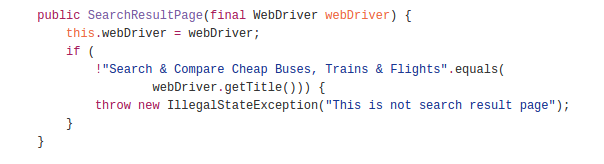

Screenshot from 2016-06-06 15:12:12.png


But this is not the only use case of a check on page object. When returning data set from page object one could also check if data set is empty, for ex following method checks if collection of webelement is empty using Preconditions.checkState() method before returning it’s content -


Screenshot from 2016-06-06 15:16:36.png


In the above code snippet, if element list is empty then page object method would throw IllegalStateException exception. This check could also be carried out on test method which receives the member name list. But I prefer to keep such checks on page object method and focus on assertion on test method. What do you think of this approach? Do you also have such checks in your page object methods?

Popular posts from this blog

Verify email confirmation using Selenium

Note: If you are new to java and selenium then start with selenium java training videos .     Email confirmation seems to be integral part of any registration process. I came across an application which lets you provide your email address. You can follow the sign up link in you mail and then complete the registration process. Lets consider we provide GMail address for it. Now if were to use only Selenium then we would have to follow following steps - Launch GMail using Selenium; Some how search for new mail in the list of available mails; Some how click on it; Parse the mail message; Get the registration link; Follow up with registration process What do you think of an approach in which you can

Selenium Tutorial: Get attribute of an element

With Selenium 1.0 Let us consider Google Search Box for example and its "max length"is to be retrieved. Using xPath -         String var = selenium.getAttribute("//input[@name='q']/@maxlength");         System.out.println(var); Using css locator -                        String var = selenium.getAttribute("css=input[name='q']@maxlength");         System.out.println(var);        With Selenium 2.0 (WebDriver)        Using xPath -         String var = webDriver.findElement(By.xpath("//input[@name='q']")).getAttribute("maxlength")         System.out.println(var); Using css locator -                     ...

Capture network traffic using WebDriver

We often come across testing requirements when we need to analyze the network traffic to find - HTTP status of page Analyze header information to find if right information is passed Validating parameters related to ajax requests etc Selenium 1 has had a way to capture n/w traffic but the feature does not always work as expected. At times Selenium 1 does not capture all n/w traffic, And given that Selenium 1 APIs are almost dead it is