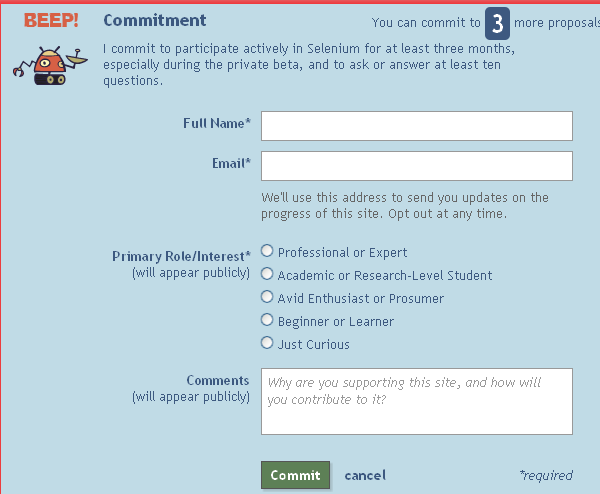
Did you support Selenium Proposal at area51?


There is an effort from SeleniumHQ to migrate selenium user forum from Google Groups to more snazzy and user friendly Stack Exchange. You can find more on this here  
So please go ahead and commit to -  http://area51.stackexchange.com/proposals/4693/selenium

To do so, you need to login to Stack Exchange site using Google/Yahoo id


Now click on Commit button and


Fill in a bit of details and yes one more thing is pending yet! You need to confirm your email address only after which your commitment would appear on site.


 And do pass it on to other Selenium enthusiasts in your contact list.


Since most you have been wondering about advantages of Stackoverflow site over Google Groups, here are the couple of pointers -

# As soon as you type in Title for question in Stack Exchange site, it
shows related question. This makes it easy to find if such question is
already asked. No such feature with Google Groups.
# Being able to tag your question in Stack Exchange site which is not
possible with Google Groups. This makes searching on such tagged
questions absolutely easy. No similar feature with Google groups.
# Formatting of question(bold, italic, hyperlink etc), distinguishing
code block from rest of the post to make it stand out are excellent
features of Stack Exchange site. Google groups just can not with stand
these.
# You earn reputation for every answers which is marked as right, this
gives you more credibility on site. Again Google Groups lacks this.
# Being able to thumbs up or down a specific question or answer, and
in fact close it eventually if it is off topic for site. No similar
feature on Google Groups.

Comments

Popular posts from this blog

Using xPath to reach parent of an element

Note: If you are new to java and selenium then start with selenium java training videos .   I prefer css locator over xPath but there are times when css locators don't fit requirement. One such requirement is when you want to navigate to parent element of an element and may be parent of parent and even more. Unfortunately css locators don't provide any mechanism to navigate to parent of an element. See this for more. Of late I came across a scenario when I wanted to click on a link depending upon the text in a text box. Herein parent of text box and parent of link were at the same location. More over there could have been many such combinations in application. Fortunately I just need to pick first such instance and Web Driver any way considers only first instance when multiple locators are found matching an element. Element in question is in following html - Here I need to click on highlighted anchor on the basis of input element (which is also hig...

Selenium Tutorial: Ant Build for Selenium Java project

Ant is a build tool which could be used to have your tests running either from command line or from Hudson CI tool. There is detailed documentation available for ant here but probably you need to know only a little part of it for you selenium tests. The essentials which are needed to know are: Project Target (ant execution point and collection of tasks) Tasks (could be as simple as compilation) And there would usually be following targets for Selenium tools - setClassPath - so that ant knows where you jar files are loadTestNG - so that you could use testng task in ant and use it to execute testng tests from ant init - created the build file clean - delete the build file compile - compiles the selenium tests run - executes the selenium tests Here is my project set up for ant -

Verify email confirmation using Selenium WebDriver

Note: If you are new to java and selenium then start with selenium java training videos .   How to Verify Email Confirmation Using Selenium 4 and JavaMail (2026 Guide) Email confirmation is a critical part of most registration flows — account activation, password reset, multi-factor authentication, and onboarding. Every automation engineer eventually faces the same challenge: How do you verify an email confirmation link inside a Selenium test without making it slow and flaky? The wrong instinct is to automate Gmail's UI with Selenium. It's fragile, slow, and breaks constantly. The right approach: Use Selenium for browser automation Use JavaMail (IMAP) to read the email directly Extract the confirmation link Continue the test in Selenium Why Not Automate Gmail UI With Selenium? Automating the Gmail UI means logging in, searching, clicking a message, and parsing content from a third-party interface that changes frequently. This leads to: Flaky...